

Bloom Review 2026
Multi-chain Telegram trading bot for Solana, Ethereum, BSC, Base and HyperEVM with sniping, copy trading, AFK mode, limit orders, a web Manager dashboard and a Chrome extension.
- Platform: Telegram + Web + Browser extension
- Pricing: 1% fee
- Networks: 7 networks
Bloom review: quick verdict
Bloom is a multi-chain trading bot delivered as Telegram bots, a web dashboard called Bloom Manager and a Chrome extension. It targets traders who want the same automation on Solana and EVM chains: a sniper, real-time copy trading, AFK mode that buys to your filters while you are away, multiple limit orders, X-triggered trades and an in-bot bridge.
Supported chains are Solana, Ethereum, BNB Chain, Base, HyperEVM, Arc and Robinhood Chain. The fee is 1% on every buy and sell, or 0.9% for accounts created through a referral link, with cashback and a three-tier referral program. Bloom's documentation covers trading features in depth, but the pages reviewed do not describe private-key export or two-factor authentication, so custody details should be confirmed in the bot before depositing. It has no native analytics layer.
Best for
Traders who want one bot across Solana and EVM chains with sniping, copy trading and AFK automation, plus a browser panel on desktop.
Not ideal for
Traders who need documented key export or 2FA before depositing, built-in wallet analytics, or a native mobile app.
What is Bloom?
Bloom is a trading bot that spans Solana and a set of EVM chains, delivered as Telegram bots, a web dashboard called Bloom Manager and a Chrome extension. It covers spot trading, sniping, copy trading, an AFK mode for hands-off automation, limit orders, X automation and in-bot bridging, and charges 1% per trade.
Bloom describes itself as an all-in-one trading solution for beginners and experienced traders. The Telegram bots are the mobile-first surface: separate bots for Solana, including a US-region bot, and for EVM chains, with spot buys and sells, a sniper for new tokens, real-time copy trading, AFK mode, multiple limit orders, Twitter/X automation that trades on posts, and a bridge for moving funds between chains without leaving the bot.
Bloom Manager is the web dashboard: portfolio overview, wallet management, PnL analytics, referral tracking, task configuration for copy trading, sniping, AFK and limit orders, a bridge page and a token deploy tool. The Chrome extension adds a Quick Panel for one-click execution on desktop sites with settings managed in Manager. Supported chains are Solana, Ethereum, BSC, Base, Robinhood Chain, Arc and HyperEVM.
Fees are 1% on every buy and sell, reduced to 0.9% for accounts created through a referral link, with cashback on trades and a three-tier referral program. Bloom's documentation index has wallet setup and multi-wallet pages, but the pages we could retrieve do not describe private-key export or two-factor authentication in detail, so we mark those as not documented and recommend reading the Wallets pages before depositing.
At a glance
Best for: Traders who want one bot across Solana and EVM chains with sniping, copy trading and AFK automation, plus a browser panel on desktop
- Platforms
- Telegram, Web, Browser extension
- Markets
- Solana memecoins, Ethereum, BSC and Base tokens, HyperEVM, Arc and Robinhood Chain tokens
Supported networks
 Solana
 Ethereum
 BNB Chain
 Base
Base HyperEVM
 Arc
Arc Robinhood Chain
Capabilities
- Copy trading
- Automation
- Wallet tracking
- Alerts
- Risk controls
- Limit orders
Not documented: Key export, 2FA
Embed badge
Show your Memecoin University listing on your own site. Platinum Standard is our own editorial classification, not an external certification. Why Platinum?
Bloom features
Each feature below is described in Bloom's official documentation or product pages. Features that could not be verified are left out.
Sniper
Snipe new Solana and EVM tokens with configurable amounts, slippage, priority and filters, managed from Telegram or Manager.
Copy trading
Real-time mirroring of chosen wallets with your own sizing and exit rules, on Solana and EVM chains.
AFK mode
Automated buying based on your filters while you are away, with take-profit and stop-loss handling.
Limit orders
Multiple limit buys and sells per token by price or market cap.
Bloom Manager and Chrome extension
Web dashboard for portfolio, wallets, PnL and task configuration, plus a browser Quick Panel for one-click execution on desktop.
Bridge and multi-wallet
Move funds between supported chains inside the bot and run several wallets per chain.
How Bloom works
Most users start in Telegram and add Manager or the extension later; they share the same account.
- 1
Open the right bot
Start @BloomSolana_bot for Solana (or the US1 bot if directed) or @BloomEVMbot for EVM chains. Check handles against the Useful Links page in the docs.
- 2
Set up wallets
The bot generates trading wallets; you can add multiple wallets per chain. Fund them by deposit or bridge from another chain.
- 3
Configure settings
Set buy and sell presets, slippage, priority fees and anti-MEV options in the bot or in Bloom Manager.
- 4
Trade or automate
Paste a contract address to trade, or create sniper, copy-trade, AFK or limit-order tasks.
- 5
Use Manager and the extension
Track portfolio and PnL in Manager, and install the Chrome extension for one-click trading from desktop sites.
Bloom pricing and fees
Bloom charges 1% on every buy and sell, reduced to 0.9% for accounts created through a referral link. Cashback on trades and a three-tier referral program return part of the fee.
- Subscription
None
- Trading fee
1% on every buy and sell
0.9% (a 10% discount) when you sign up through a referral link.
- Cashback
Cashback on every trade
Bloom advertises cashback tied to growth levels; the exact percentages are on the Cashback and Growth Levels pages.
- Referrals
Three-tier program
Passive income from referred users' fees across three levels.
- Network and bridge costs
Varies
Gas, priority fees and bridge costs are separate from Bloom's fee.
Fee example
At 1%, a $1,000 buy incurs a $10 platform fee, and a later $1,000 sell incurs another $10.
Cashback or rebates, where offered, are paid back separately and do not change the headline fee. Network, priority, slippage and third-party costs may apply on top.
Sources: Fees Structure, Cashback, Referrals, Growth Levels
Is Bloom safe?
Bloom generates trading wallets for you and signs on its infrastructure, with wallets managed from the Telegram bot or Bloom Manager. The documentation pages we could retrieve do not detail private-key export or two-factor authentication, so verify those on the Wallets pages before depositing.
- Custody model
- Bot-generated wallets signed on Bloom's infrastructure; multi-wallet support per chain.
- Key export
- Not documented in the sources reviewed.
- Two-factor authentication
- Not documented in the sources reviewed.
- Official bots
- @BloomSolana_bot, @BloomSolanaUS1_bot and @BloomEVMbot, listed on the Useful Links page.
- Regional bots
- Bloom runs a separate US1 Solana bot; use the one the docs direct you to.
Check custody details yourself
Bloom's docs cover trading features in depth but the wallet pages we could retrieve stop short of describing key export and 2FA. Until you have confirmed both in the bot's Wallets and Settings menus, treat Bloom as a hot wallet whose keys are held by the operator and deposit accordingly.
Verify before depositing
- You are using a bot handle listed on the official Useful Links page, not a look-alike.
- You have checked the Wallets menu for private-key export and any security settings before depositing.
- You keep only active trading capital in the bot wallets.
Official channels
- Website www.bloombot.app
- Documentation docs.bloombot.app
- Bloom Manager manager.bloombot.app
- X (Twitter) x.com/BloomTrading
- Discord discord.gg/bloomtrading
Anything not listed here should be treated as unofficial until confirmed through one of these channels.
Sources: Wallets setup (Solana), Manager wallets, ToS and Privacy Policy, Useful Links
Bloom strengths and considerations
An editorial summary of the sources reviewed. Strengths are advantages supported by documented functionality; considerations are limitations, trade-offs or gaps worth weighing.
Strengths
- One account across Solana and six EVM chains with sniper, copy trading, AFK mode and limit orders
- Three surfaces: Telegram bots, the Bloom Manager web dashboard and a Chrome extension
- In-bot bridge and multi-wallet management
- Simple, published fee: 1%, or 0.9% via referral
- Extensive documentation for every task type
Considerations
- Private-key export and 2FA are not described in the documentation we could retrieve
- Closed source with no published audit
- No native analytics layer; research happens elsewhere
- Regional bots and three surfaces add setup complexity
- No public API
Bloom supported chains
Bloom supports 7 networks: Solana, Ethereum, BNB Chain, Base, HyperEVM, Arc and Robinhood Chain. The sources reviewed do not break down which features are available on each network, so the table confirms support only.
| Network | Supported | Notes |
|---|---|---|
 Solana Solana | Yes | Has dedicated Telegram bots, including a separate US-region bot. |
 Ethereum Ethereum | Yes | Traded through the Bloom EVM bot. |
 BNB Chain BNB Chain | Yes | Traded through the Bloom EVM bot. |
 Base Base | Yes | Traded through the Bloom EVM bot. |
 HyperEVM HyperEVM | Yes | — |
 Arc Arc | Yes | — |
 Robinhood Chain Robinhood Chain | Yes | — |
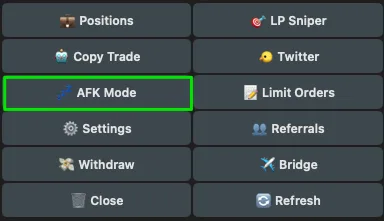
Bloom screenshots
Official media published by Bloom. We do not create mock-ups or use third-party images.
Bloom FAQ
What is Bloom?
Bloom is a multi-chain trading bot delivered as Telegram bots, a web dashboard called Bloom Manager and a Chrome extension. It supports Solana, Ethereum, BSC, Base, Robinhood Chain, Arc and HyperEVM with spot trading, sniping, copy trading, AFK mode, limit orders and bridging.
How much does Bloom cost?
1% on every buy and sell, or 0.9% if you created your account through a referral link. There is no subscription, and Bloom pays cashback and three-tier referral rewards.
Does Bloom support copy trading?
Yes. Real-time copy trading is available on Solana and EVM chains, configured in the bot or as a task in Bloom Manager.
What is AFK mode?
AFK mode buys tokens automatically based on filters you set and manages exits while you are away from the screen.
Can I export my private key from Bloom?
The documentation pages we could retrieve do not describe key export or 2FA. Check the Wallets menu in the bot or Manager and confirm before depositing significant funds.
Which Telegram bots are official?
@BloomSolana_bot, @BloomSolanaUS1_bot and @BloomEVMbot, as listed on the Useful Links page of docs.bloombot.app.
Which chains does Bloom support?
Solana, Ethereum, BSC, Base, Robinhood Chain, Arc and HyperEVM.
What are the best Bloom alternatives?
The closest alternatives to Bloom in this directory are BasedBot, Trojan, BONKbot, GMGN. BasedBot: Multi-chain Telegram bot with a web terminal and extension, 1% fee and 30% instant cashback. Trojan: Solana-only Telegram bot with a documented key-export flow and Secure Action Password. See the comparison table below for fees, chains and features side by side.
Bloom alternatives
How Bloom compares with the closest tools in this directory, using the values from each tool's own listing.
| Tool | Platform | Chains | Fee | Copy trading | Wallet tracking | Limit orders | One USDC balance |
|---|---|---|---|---|---|---|---|
 BloomThis page BloomThis page | Telegram, Web, Extension | 7 | 1% | Yes | Yes | Yes | No |
 DawnEditor's pick DawnEditor's pick | Telegram | 6 | 1% | Yes | No | Yes | Yes |
 BasedBot BasedBot | Telegram, Web, Extension | 19 | 1% | Yes | Yes | Yes | Not documented |
 Trojan Trojan | Telegram | Solana | 1% | Yes | Yes | Yes | n/a |
 BONKbot BONKbot | Telegram, Web, iOS, Android | Solana | 1% | No | Yes | Yes | n/a |
 GMGN GMGN | Web, Telegram, iOS, Android | 5 | 1% | Yes | Yes | Yes | No |
BloomThis page
Telegram, Web, Extension · 7 chains · 1% fee
- Copy trading
- Yes
- Wallet tracking
- Yes
- Limit orders
- Yes
- One USDC balance
- No
DawnEditor's pick
Telegram · 6 chains · 1% fee
- Copy trading
- Yes
- Wallet tracking
- No
- Limit orders
- Yes
- One USDC balance
- Yes
Telegram, Web, Extension · 19 chains · 1% fee
- Copy trading
- Yes
- Wallet tracking
- Yes
- Limit orders
- Yes
- One USDC balance
- Not documented
Telegram · Solana · 1% fee
- Copy trading
- Yes
- Wallet tracking
- Yes
- Limit orders
- Yes
- One USDC balance
- n/a
Telegram, Web, iOS, Android · Solana · 1% fee
- Copy trading
- No
- Wallet tracking
- Yes
- Limit orders
- Yes
- One USDC balance
- n/a
Web, Telegram, iOS, Android · 5 chains · 1% fee
- Copy trading
- Yes
- Wallet tracking
- Yes
- Limit orders
- Yes
- One USDC balance
- No
Yes SupportedNo Not offeredn/a: single-chain toolNot documented: the sources reviewed did not confirm it either way
BasedBotTrading Bots
Multi-chain Telegram bot with a web terminal and extension, 1% fee and 30% instant cashback.
TrojanTelegram Bots
Solana-only Telegram bot with a documented key-export flow and Secure Action Password.
BONKbotTelegram Bots
Solana Telegram bot with a non-custodial signing model and 2FA.
GMGNAnalytics
Multi-chain bots and terminal with a much deeper analytics layer.
Keep exploring: all trading bots, memecoin tool rankings, the full tools directory or how we review tools.
Sources used for this listing (16)
Official documentation and product pages come first, then official announcements, then reputable third-party coverage where primary sources were unavailable.
- Welcome to Bloomdocs.bloombot.app/welcome-to-bloom.md
- Fees Structuredocs.bloombot.app/grow-with-bloom/fees-structure.md
- Cashbackdocs.bloombot.app/grow-with-bloom/cashback.md
- Referralsdocs.bloombot.app/grow-with-bloom/referrals.md
- Growth Levelsdocs.bloombot.app/grow-with-bloom/growth-levels.md
- Solana wallets setupdocs.bloombot.app/solana/getting-started/wallets-setup.md
- Solana useful linksdocs.bloombot.app/solana/getting-started/useful-links.md
- Solana copy tradedocs.bloombot.app/solana/solana-bot/copy.md
- Solana sniperdocs.bloombot.app/solana/solana-bot/sniper.md
- Solana AFK modedocs.bloombot.app/solana/solana-bot/afk.md
- Solana limit ordersdocs.bloombot.app/solana/solana-bot/limit-orders.md
- Solana bridgedocs.bloombot.app/solana/solana-bot/bridge.md
- Manager walletsdocs.bloombot.app/manager/pages/wallets.md
- Manager extensiondocs.bloombot.app/manager/pages/extension.md
- Manager bridgedocs.bloombot.app/manager/pages/bridge.md
- ToS and Privacy Policydocs.bloombot.app/miscellaneous/tos-and-privacy-policy.md